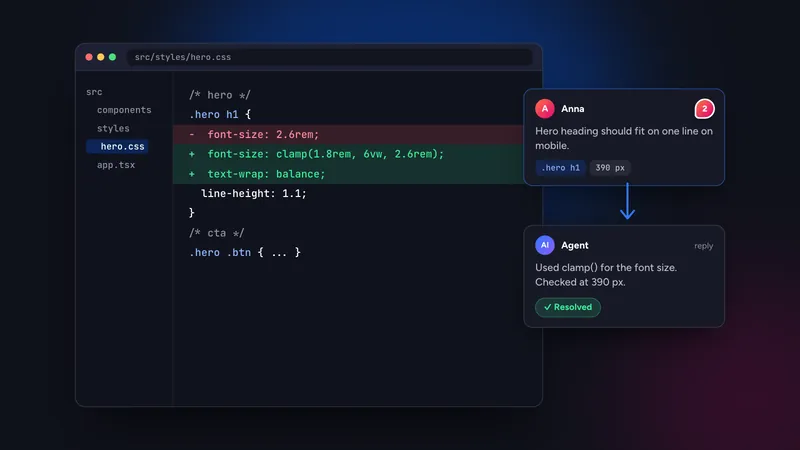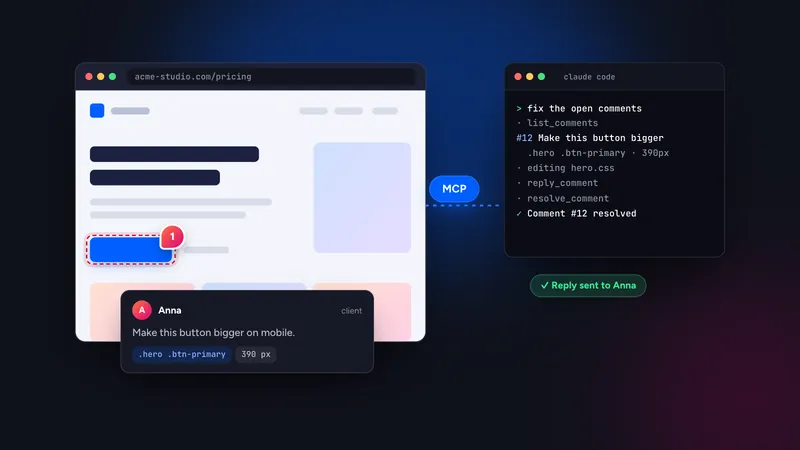
To give Claude Code website feedback over MCP, create an access token in Symu 2, run one claude mcp add --transport http command with your personal link, and then ask Claude Code to fix the open comments. The agent reads each comment with its selector, HTML snippet, page URL and breakpoint, edits your code, then replies and resolves the thread.
In this guide
What you need
- Claude Code installed and working in the repository of the site you are fixing.
- A Symu 2 account with a project for the website. The 14-day trial includes the MCP server.
- A site URL that is reachable from the internet. Symu 2 loads the page from its servers, so use a preview deployment, staging or production, or a tunnel for a local project.
- A few comments to work on. Pin them yourself, or send the share link to a client.
Step 1: connect Claude Code
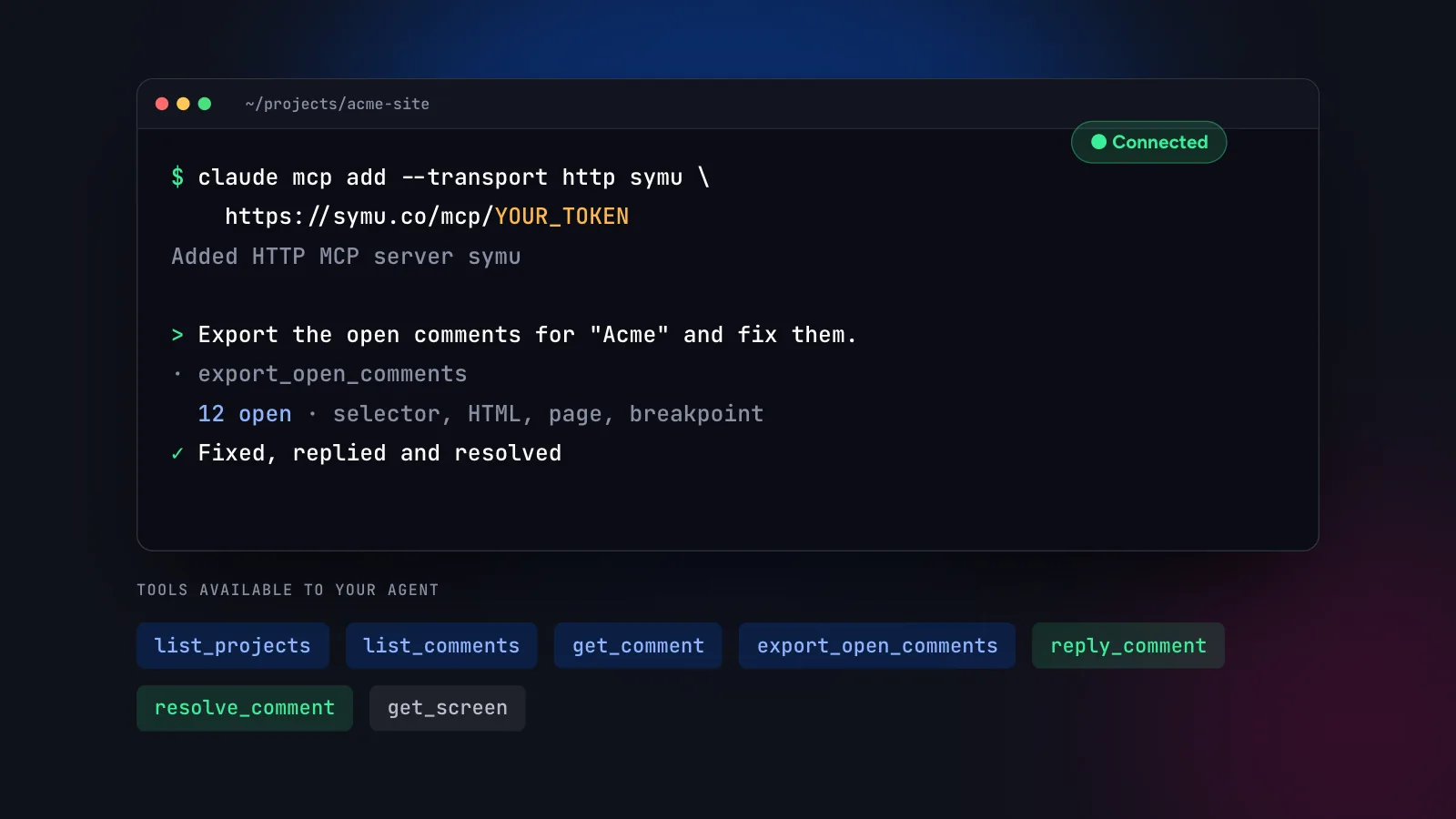
In the Symu 2 panel, open “MCP for AI” in the header. It shows a ready-made command with your personal token. Copy it and run it in your terminal:
$ claude mcp add --transport http symu https://symu.co/mcp/YOUR_TOKEN
The token identifies you and what you can read. You can create several named tokens, for example one per laptop, and revoke any of them under Settings, AI access. Treat the link like a password: do not commit it to a repository or paste it into a public issue.
Claude Desktop uses the same link as a custom connector, and other MCP clients that support remote HTTP servers can use it too. For Cursor see Cursor + MCP: turning client comments into code changes.
Step 2: check the connection
Start Claude Code in your project and list the connected servers with the /mcp command. The symu server should appear as connected. If you prefer a functional check, ask a harmless question first:
Use the symu MCP server to list my projects and how many
open comments each one has. Do not change anything yet.
Claude Code calls list_projects and answers from the result. That confirms the token works and shows the project names you will use in later prompts.
Step 3: run your first fix
Now give the agent a real task. A good first prompt is specific about scope and about what “done” means:
Use the symu MCP server. Export the open comments for the
"Acme" website. Fix them one at a time in this repository.
After each fix, reply on the comment with a one-line summary
of what you changed, then resolve it. Stop and ask me if a
comment is unclear.
Behind the scenes the agent typically calls export_open_comments or list_comments, then get_comment for the detail it needs. Each comment arrives with the element’s CSS selector and XPath, an HTML snippet, the page URL, the breakpoint and a link to the screenshot. The agent searches the repository for that selector, class or visible text, edits the file, and calls reply_comment and resolve_comment.
Review the diff as you would for any change. The reply on the thread tells your client what changed, which saves a round of messages.
How the feedback flows
The loop has five steps, and only the fourth needs a code editor:
The tools exposed to the agent are list_projects, list_comments, get_comment, export_open_comments, reply_comment, resolve_comment and get_screen. Their full descriptions are on the MCP page.
Prompts that work well
Fix everything on one page
Use symu. List open comments for the Acme project filtered
to the /pricing page. Fix them, keep the existing colors
and spacing scale, and resolve each comment with a reply.
Fix mobile problems only
Use symu. List open comments with breakpoint "mobile".
Change CSS only inside the mobile media queries so the
desktop layout stays the same.
Plan first, then edit
Use symu. Export the open comments and group them by file
you expect to touch. Show me the plan. Do not edit anything
until I say go.
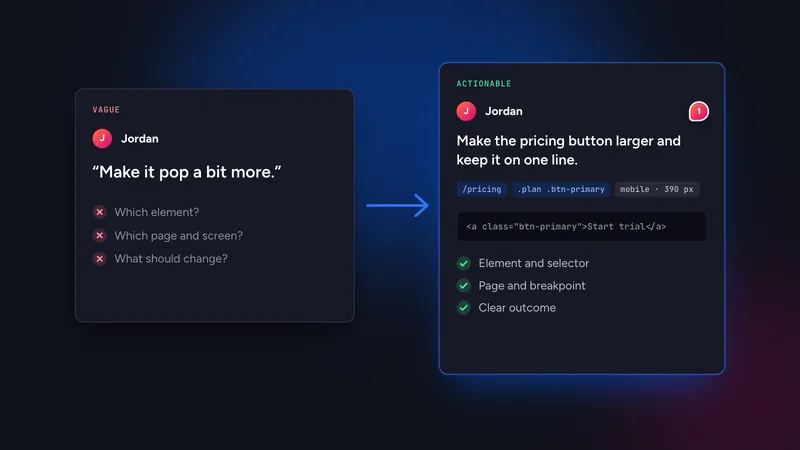
For more patterns see how to write feedback an AI agent can act on. The wording of the comments matters as much as the wording of your prompt.
Permissions, safety and team use
Giving an agent access to feedback is low risk compared with giving it access to production, but a few habits keep it that way.
- Work on a branch. Ask Claude Code to make changes on a feature branch, so you can review one diff for all the fixed comments before anything is merged.
- Review before resolving at scale. Agents can resolve comments as they go. For a client project it is reasonable to let the agent reply and set threads to resolved only after you have read the diff, or to ask it to leave them open with a reply and resolve them yourself.
- One token per person and device. Named tokens make it clear who connected what, and you can revoke a single token without breaking the rest of the team.
- Keep secrets out of comments. Comments are read by the agent and stored in the project. Do not paste passwords or API keys into them.
- Deploy before you verify. Symu 2 shows the live URL, so after the agent fixes a comment the change must be on your preview or staging site before you re-check it in the browser.
Teams often split the work: a designer or client pins the comments, a developer runs the agent, and everyone sees the replies in the thread. Notifications by email, Slack or Discord tell the reviewer when something was resolved, so nobody has to ask.
Troubleshooting
- The server is not listed. Run the
claude mcp addcommand again from the project directory, then restart Claude Code. Check that the link was pasted completely. - The agent sees no comments. It may be looking at a different project, or all comments are already resolved. Ask it to list projects and counts first.
- The agent edits the wrong file. Mention the framework or folder in your prompt, for example “components live in src/components”. The selector alone cannot tell it where your code is.
- You cannot use MCP in a given tool. Use “Copy as AI prompt” on a comment or “Export for AI” for a markdown task list. Both carry the same element context.
- Lost a token. Revoke it under Settings, AI access, create a new one and run the command again.
Ready to try it? Start the 14-day free trial, paste a URL and let Claude Code read your first comment. If you build with Lovable, Bolt or v0, the vibe coding workflow shows the same loop from the other side.