
1Feedback
The easiest way to get feedback
Clients click anywhere on your live site or design and comment right there. Each comment becomes a task, and your AI can read it through MCP.
 Add a comment anywhere
 Every added comment becomes a task
NewIntroducing Symu 2 · Built for AI
Clients comment on real elements of your site. Your AI coding agent reads every comment through MCP and fixes it.
14 days free · no credit card · then $19/month
Still presenting mockups? Upload designs from
 Photoshop
 Chrome
 PDF files
 Slack
SlackHow it works
No script to install on the site. Paste a link, share it with your client and let your AI do the fixing. Design uploads work the same way.
Add a live site by its URL, or upload a design with drag and drop, the Photoshop plugin or the Chrome extension.
Send a private email or a shareable link. Clients don’t need an account.
They browse the page and pin comments to exact elements, on desktop, tablet or mobile.
Claude reads each comment with its element context, changes your code, replies and resolves it.
Workflow automation
You will be notified about all status changes via email. You can view the history of these changes in the “Activity” tab.
Read the Quickstart GuideFeedback for AI-assisted development
Click through your live site, pin comments to real elements, and let Claude read them with the exact page, element and screen size. No more “the button on the pricing page, you know, the blue one”.
$ claude mcp add --transport http symu https://symu.co/mcp/…
✓ Added MCP server symu

> Fix the open Symu comments on /pricing

⏺ symu.get_comment(12)
  #12 [open] by Anna (client) · Website "Acme"
  Comment:  "Make this button green and say 'Start free'"
  Page:     https://acme.com/pricing · desktop 1440×900
  Element:  <button.btn-primary#signup> "Sign up"
  Selector: #plans > div.card:nth-of-type(2) > button

⏺ Edited src/Pricing.tsx +2 −2
⏺ symu.reply_and_resolve(12) ✓ resolvedSymu + MCP
Open MCP for AI in the panel header, copy one line and paste it into your terminal. It works with Claude Code, Claude Desktop and any MCP client.
Features
Browse your live website or a design in the browser, comment on exact elements and keep every task in one place.
1Feedback
Clients click anywhere on your live site or design and comment right there. Each comment becomes a task, and your AI can read it through MCP.
Add a comment anywhereEvery added comment becomes a task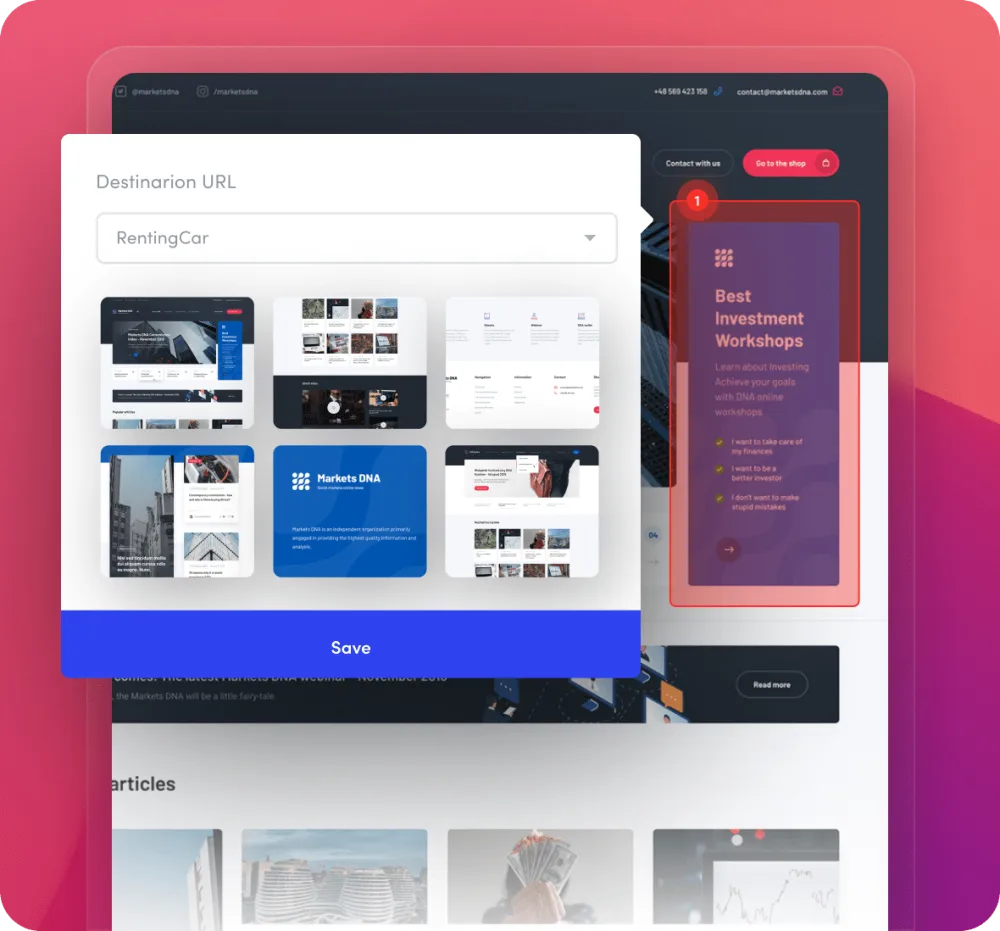
2Prototyping
Symu gives you the ability to prepare a dynamic presentation for your websites. Thanks to features such as fixed headers your project will be very similar to a finished site!
Our hotspots feature allows you to create a clickable model. Add a clickable area anywhere you like and create a dynamic design!
 Fixed header
 Clickable hotspots
3Teamwork
Put together a team and work with your colleagues! Both you and your colleagues will be able to upload your work to a shared folder.
Set permissions for your teammates. This will allow you to manage your teammates’ access and set roles within the team.
 Teamwork
 Managing every teammate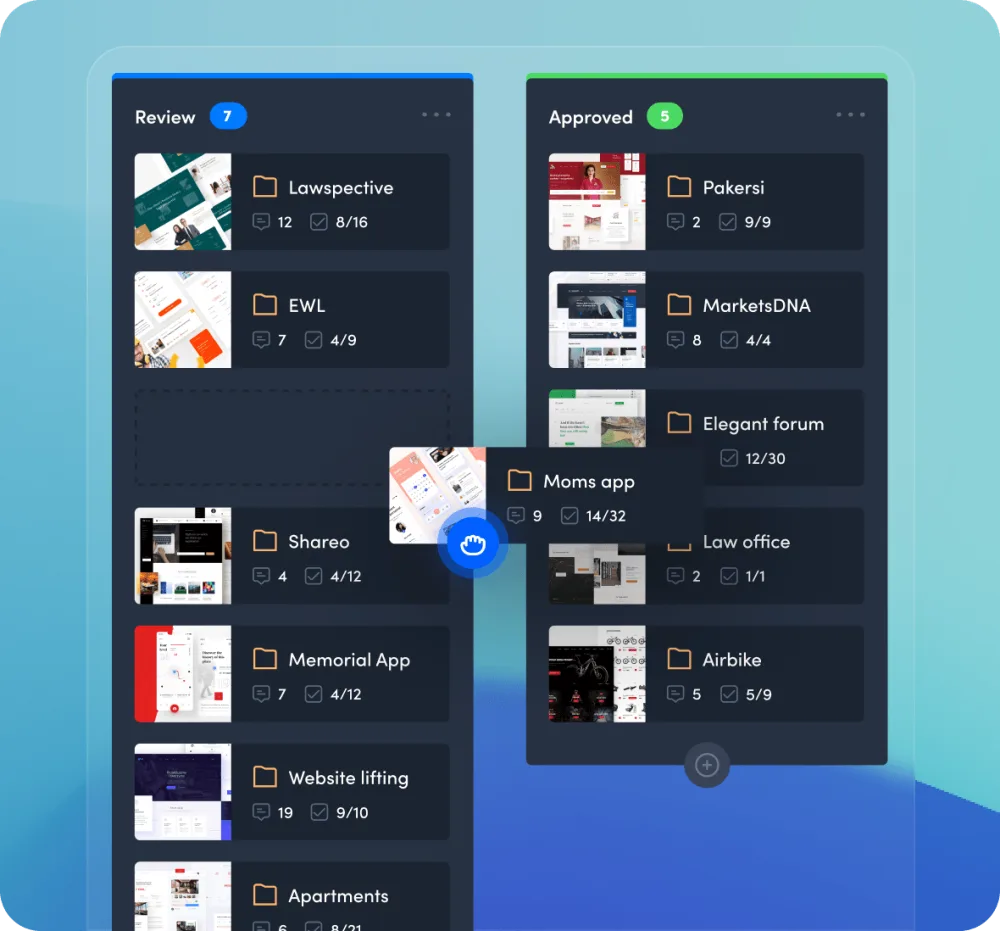
4Workflow
Set the status of multiple projects in a single clever panel. Simply drag a project to the appropriate group and its status will change automatically!
Create a dependency tree with your projects, groups and subgroups. Our panel allows you to manage different projects from one accessible place.
 Project workflow
 Parent and sub groups
Extensions
A brand-new Photoshop plugin and Chrome extension, plus integrations that speed up your workflow – from PDF files to Slack.
 New UXP plugin
It takes just one click to upload your design to Symu. Symu recognizes the file and updates the current project with the new version.
 New version
Grab full-length snapshots of live websites, upload files from your hard drive and monitor the activity stream.
PDFUpload your multi page PDF file and get feedback from your client.
Learn moreAvailableConnect your Slack account with Symu and receive feedback from your clients faster.
Connect Coming soon
Upload your projects directly from Dropbox and easily share files with clients and collaborators.
 Coming soon
Upload your projects directly from Google Drive and easily share files with clients and collaborators.
Pricing
Try every feature free for 14 days – no credit card required. Then $19 a month, cancel anytime.
 Symu
Symu$19/ month + VAT
One plan, billed monthly in USD. Cancel anytime.
Start 14-day free trialPay with PayPal or a credit/debit card + 23% VAT for Poland and EU consumers. EU businesses: reverse charge.
Prices in USD, excluding VAT. See all details and FAQ on the pricing page.
Symu 2 is an AI-native website feedback tool. You paste the URL of a live website, clients and teammates comment on any element directly on the page, and AI coding agents such as Claude Code and Cursor read the comments through MCP with the selector, HTML, page URL and screen size.
No. Symu 2 loads the website by URL through a server-side proxy and adds the commenting layer itself, so nothing is added to the site you are reviewing.
No. Clients open a share link, enter a name and comment. Comments arrive in your project as tasks.
Open “MCP for AI” in the panel header, copy the one-line command and run it in your terminal. Claude Code, Claude Desktop, Cursor and other MCP clients can then list open comments, read their element context, reply and mark them resolved.
One plan for $19 per month plus VAT where applicable. Every account starts with a 14-day free trial that needs no credit card.
Yes. Images, PDF files, Photoshop captures and the Chrome extension still work, and design feedback lives next to your live website projects.
Paste a URL, invite your client and let Claude fix the comments. 14 days free, then $19/month.